Skip to content

A PLAY EXPERIENCE MAKER'S WORK LOG FOR FUTURE SELF©2001 – 2023 Kyle Li 李肅綱 All Rights Reserved.

Author: Kyle Li

Meteor Multiplication

Posted on September 20, 2009 by Kyle Li

Found this vintage game for my TI 99/A4 today in a thrift store. It is a fun, engaging, and brain twisting game. Multiple giant meteors are approaching player’s space station in various speeds, each of them is carrying a multiplication problem on it. Player has to destroy them before any one of them hit the station. Player has to pick a meteor, enter correct answer to target’s multiplication problem, and then shoots a leaser. If the answer is correct, the meteor will be destroyed, other wise, it will pull the meteor even closer. Player has to destroy all 8 meteors in order to pass the level, and they get faster and faster as level goes up.

I imagine this could be a fun and engaging game in SMALLab. The game puts players in the center of tension. Burning meteors approaching from all different directions in various speeds. Players have to charge their laser cannon, find the most threaten target, calculating attached multiplication, and blast the target with their answer-embedded laser beam.


[PETLab] Posters for Boys & Girls Clubs of America GameTech

Posted on September 13, 2009 by Kyle Li

I designed 4 posters, it was so much fun revisiting my old tool bag and doing something different for a change!

[Copied from Colleen Macklin’s blog post] BGCA GameTech Program is a two-unit program utilizing principles of active learning to teach how to program computer games. The curriculum is designed to expose Club members to a number of important skill sets—systems thinking, introductory programming concepts, principles of game design, and the process of iterative design. The program utilizes a four-phase system modeled on the iterative design process—Think, Design, Play Test and Change.
design_process
game_design
scratch
SOCIAL_ISSUE


gametech_posters_final-1024x691

Colleen Macklin here
Colleen Macklin & John Sharp in Different Game conference: here
Petlab here

PETLab: Mannahatta

Posted on September 5, 2009August 31, 2021 by Kyle Li

8

Overview

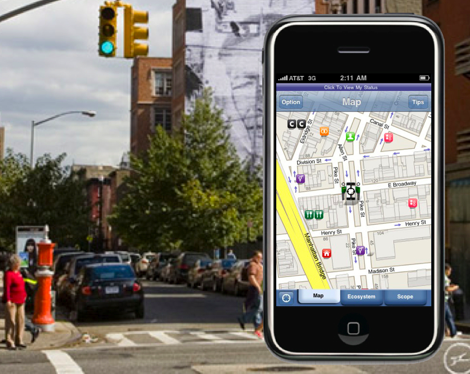
Mannahatta: The Game  is a functional prototype for a location-based smart phone game that maps Manhattan’s historical ecosystem onto its modern day streets. Players move from block to block and gain points when they make connections between ecological elements—including flora, fauna, wind, soil, and water—that existed in the same location when Henry Hudson arrived on the island in 1609. Game play requires growing understanding of ecosystems, managing resources and creating strategic plans for moving about the city.  Working individually or as part of a team, a player must connect ecosystem elements across as wide a territory as possible to collect points, earn badges and move to the top of the leader board. The game is targeted to families and youth aged 10-15 years old.

Mannahatta: The Game was built on data from The Mannahatta Project (http://themannahattaproject.org), created by Dr. Eric Sanderson from the Wildlife Conservation Society. At the scale of a present day city block, Sanderson probabilistically determined the flora and fauna that existed on the island 400 years ago and then mapped into onto the city grid. This relationship between historical data and spatial coordinates transforms the city into a living game board, one that fosters situated learning opportunities, encourages teamwork, and develops systems thinking skills. While the game is only a prototype currently, when finished it will exemplify a new kind of 21st century learning product that advances critical competencies through participatory, interest-driven forms of engagement. To learn more about the project, watch this presentation by Dr. Sanderson at the 2009 Global TED Conference or read the article in the September 2009 issue of National Geographic.

Project Origins and Goals

Mannahatta: The Game is a product of the New Youth City Learning Network, which is a group of cultural institutions working together to create interest-driven learning opportunities for youth in New York City with support from the John D. and Catherine T. MacArthur Foundation’s Digital Media and Learning Initiative. Members of New Youth City include the American Museum for Natural History, Bank Street College of Education, City Lore, Boys and Girls Clubs, Cooper-Hewitt National Design Museum, DreamYard, the Joan Ganz Cooney Center, El Museo del Barrio, MOUSE, the Museum for African Art, the New York Public Library, the New York Hall of Science, the Wildlife Conservation Society, and the World Science Festival.

The concept for M:TG  emerged during two design charrette sessions (the first held in March 2009 and the second in May 2009) where network organizations identified the idea of ‘neighborhood as learning context’ as a key learning principle and a viable organizing mechanism for collective action. To minimize start up costs and to legitimate the notion of extending existing institutional resources, PETLab (at Parsons The New School for Design) developed a game in the spirit of ‘neighborhood as learning context’ from existing assets (a database and website) owned by the Wildlife Conservation Society, a member organization of the Learning Network. The decision to develop M:TG reflects a commonly held conviction among network members that geographic and informatics competencies are critical for educating tomorrow’s youth. This idea also corresponds to an interest in learning about and acting on local context, especially with mobile devices, expressed by youth participants during the March and May sessions, as well as at third charette in June attended exclusively by teenagers.

The technical prototype for M:TG was developed over the summer of 2009 by PETLab  (faculty and student members of the Parsons Design and Technology Department).  The team worked for approximately ten weeks to develop the rough prototype, an iPhone application.   The first challenge was how to map the rich content of the data-base into an entertaining and substantive game that could be played persistently throughout the city.  The team’s iterative design process included technical consultation with Eric Sanderson, consultation with New Youth City Learning Network representatives, critique by game designer, educator and Parsons colleague Katie Salen.   Funding for the ten-week pilot project was approximately $90,000.  Over the course of the summer various iterations of the game were tested with different youth groups, including middle school students from Williamsburg Collegiate Charter School; 100, 18 year old English Language Learners, and a group of 12 ,15 year olds in a summer design class at Parsons. Findings from each test informed the next stage of development.

Mannahatta project site

link_icons

Learning Goals

There were four primary learning goals that drove the design and development of M:TG

1. To introduce and develop a visual and biological understanding of the natural ecosystem of Manhattan in 1609
2. To introduce and develop principles of systems thinking
3. To build comprehension in geographic visualization and navigation
4. To promote proficiency in collaborative teamwork

mockup072709

mockups072609

Game Instructions:

Look around Manhattan. What do you see? Concrete, steel, bricks, buildings, streets . . . just about everything is manmade. Now, close your eyes. Imagine yourself here 400 years ago, before European settlement. In those days, the island people, the Lenape, called this place ‘Mannahatta’. Can you envision your surroundings before there was a city under your feet, when the land was covered with lush forests, meadows, streams, ponds, and hundreds of different types of animals?

Your mission is to revive that lost natural world. Use your Habitector to identify Links that you can use to connect Elements. Correct connections will reveal new links for you to collect and use in nearby places. Correct connections also surface new elements and earn you points. The more elements you surface, the more you revive an image of the intricate ecosystem of long-ago Manhattan. The more elements you revive, the more badges you earn and the more likely you are to become a Master of Mannahatta.

right-pic

To Start

  • Players are introduced to M:TGvia the website (http://mannahattathegame.com) or through New Youth City Learning Network programming. To play the game, a player first downloads the application from the website and installs it on her iPhone or iTouch.
  • The iPhone or iTouch detects the player’s location and references that block as Home Block within the game. If a player is not located in Manhattan, the game defaults to a Times Square location.

To Play

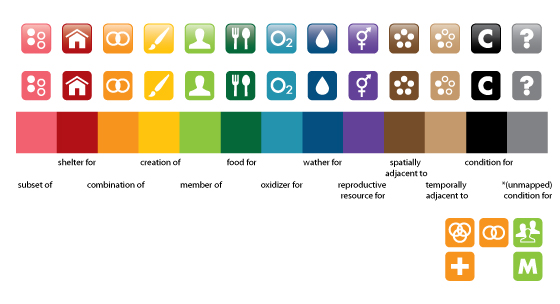
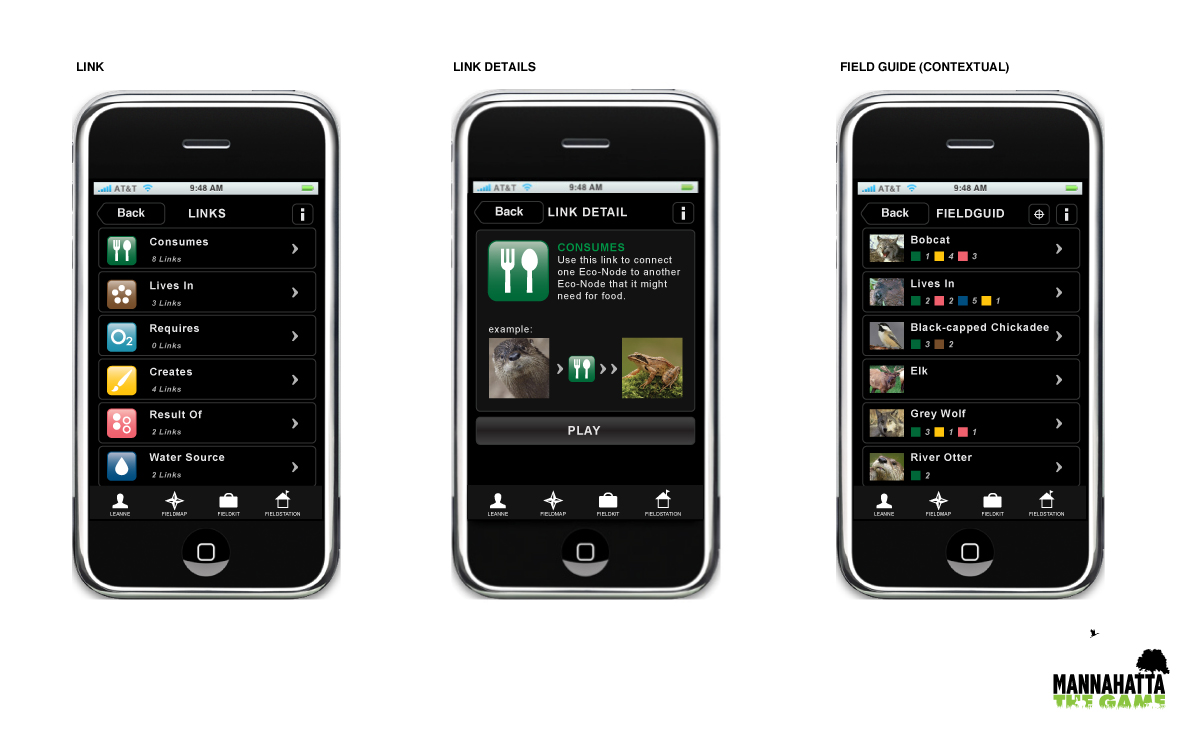
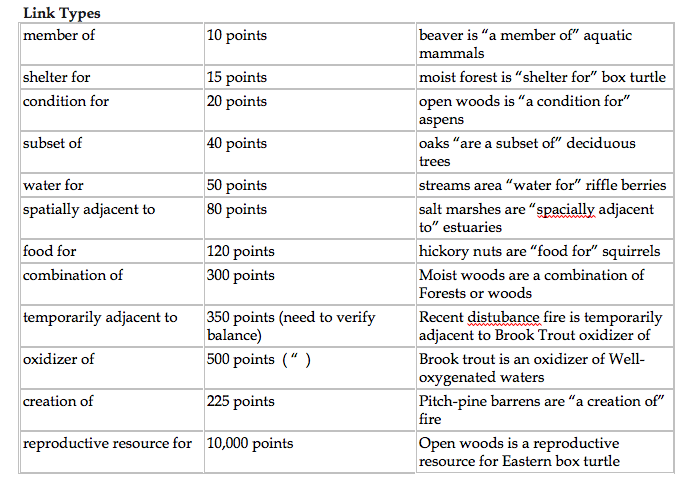
  • New players are provided with a Field Kit that contains an initial set of Links and Elements. A player enters the game when he makes his first connection between a pair of Elements in his Field Kit by using one of the Links provided. Links represent twelve different ways that a player can form relationships between Elements, such as “is food for” and “is shelter for.”

Screen shot 2013-03-04 at 1.09.58 PM

    • The game progresses as a player uses her Habitector to Surface and Connect additional Elements via Links. The maximum Capacity that a play can have in her Field Kit at any one time is 20 Links. This constraint challenges players to make strategic choices regarding which links to play at any one time (a.k.a. which connections to make) and when to move from one block to the next.
    •  Making connections using links is the scoring mechanism of the game. Correct connections are scored according to their prevalence or rarity within the historical ecosystem, with rare relationships garnering the most points.
    • As they play links and earn points by making correct connections, players also acquire Badges that announce their level of expertise. Expertise is based on the strategic use of Links and and skill at managing which blocks to play. Badges level up from Scout (10 plays of the same Link) to intermediate Ranger (25 plays of the same Link) to Master (50 plays of the same Link). Badges are worth certain points, so, for example, if a player has gained Scout status for five Blocks, Ranger for two, and Master for two, her total points would be 5*20+2*50+2*100 = 400.

Screen shot 2013-03-04 at 1.12.52 PM

  • The game also includes a Leader Board, which ranks the top players city-wide based on total points.
  • Winning: In the current prototype, there is no end state because there are hundreds of millions of connections that can be made across the island. The current version of the game works on a ‘King of the Hill’ principle, in which whomever is on top of the Leader Board at any given moment is the game champion.

Game Terminology

Badge A mark of Player expertise throughout the game. A player earns multiple badges throughout the game based on the strategic way he plays his Links. Badges also come with bonus points.
Block A current NYC city block or zone that defines a single playable unit of space in the game.
Capacity A player’s current inventory of Links. Maximum Capacity for any player at any one time is 20 Links.
Connect The act of joining two interdependent Elements together via a Link.
Connector A feature of the Habitector. Tap it to use a Link to connect two Elements.
Ecosystem The Web of life as well as its non-biological support system (such as soil and water). Ecosystem elements vary from Block to Block.
Element Any ecological entity (i.e., species, habitat, specific types of wind, soil, water) that existed on the island of Mannahatta in 1609. The main point of the game is to make the correct connections between the Elements in a Block using Links. New Elements are Surfaced through game play.
Field The island of Manhattan serves as the game board or Field.  A player must move outdoors through the physical space of the city to play successfully.
Field Guide An information guide that can be accessed at any time during game play. The field guild helps players find information about different aspects of the Ecosystem.
Generate Every time two Elements are connected using the Connector, a player generates another playable Link. The new link appears in her Field Kit by when she moves to an adjacent Block.
Habitector The locative capacities of the iPhone (GPS) and iTouch (cellular triangulation) allow the device to locate a player within the game and about the island.
Leader Board Ranks players overall according to individual achievement in points and accumulation of Badges (Scout, Ranger and Master).
Link The play in the game that joins two Elements together. The more Links played in the game, the more points and badges a player earns. Linking is also the means of Surfacing a larger and larger percentage of the total Ecosystem.
Scope A Habitector feature that allows a player to view the activities of other players. The Scope provides information about the activity on the Block where a player is currently located, an activity overview about game play across the entire island, information about the point scores and badges of other players, and the Leader Board.
Status The Status button allows a player to see her point score and Badge ranking. Status also displays a player’s current Link Capacity, total number of Links played, and total zones visited.
Surface As players successfully connects Elements with a Link using the Connector, more elements are Surfaced.

Technical Information

The Game’s custom software serves as the primary locative controller and resides within the iPhone device or Habitector. The Player installs the software by downloading the application from The Game’s website. (The iPhone was chosen based on the understanding that most New Yorkers ages ten and up, regardless of socioeconomic status, carry cell phones and that in three years time most cell phones will be “smart phones” similar to today’s iPhone.)

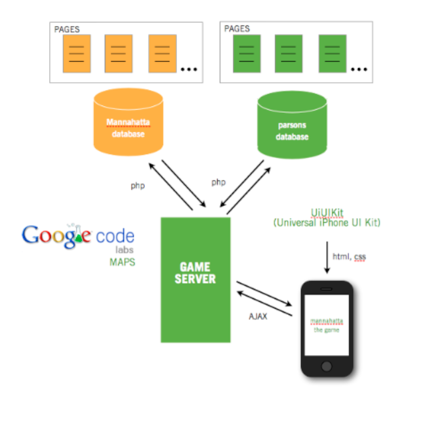
The  Game is built as a Safari Web App with a home screen navicon. The game server runs on the back end.  The game makes use of the data from The Mannahatta Project.  The game system built during the Summer of 2009 comprises the game server, the front end built using the iPhone universal UI kit, and the Google Maps API for location-based functionality.  The back end provides the front with pages that represent different screens filled in with data as needed. The primary programming language on the front-end is Javascript, which uses the jQuery library for AJAX and display functions.  PHP calls handle the communication with the databases.  The diagram below shows the basic architecture.

Screen shot 2013-03-04 at 1.23.15 PM

Rethinking the idea of history data in a browser

Posted on August 7, 2009 by Kyle Li

-Too many choices for me on a portal site, don’t know where to start.

-I want to know how everyone browsed through the web site I am in, it serves as a reference for how I am going to browse through the same site.

Imagine visiting a portal site and stunned with all the options, lost and confused.
before

By click of a button on your tool bar, the browser will create a black-and-white version of the web page, the color of each link or button will be in grey scale determined by how popular they are based on collected data over time, white color being the least popular and the black being the most popular.

after

Mobile Quest 2009

Posted on July 22, 2009 by Kyle Li

mobile quest

Mobile Quest is a five-day long mobile game design camp for 5th grader happening now (7/20/09~7/25/09). It is put together by Institute of Play and sponsored by Nokia Mobile Learning Institute and Pearson Foundation. Me and Leanne are leading one of the four teams in the camp, there are over 40 kids in total, most of them are going to Quest in Fall. Our team is the most energetic one, and they are up for game design, best combo ever. They have won all the camp wise competitions, they rock my soul!

the smart phone
My goal of this camp is to have kids at the end of camp to be able to understand a game through it’s game elements, in this context, they are components, goal, core mechanics, game space, choice, and rules. We were told in the orientation meeting that kids are not going to write anything down, so in preparation, we pasted all game design elements in huge colorful types around the room, and drew the word “FUN” and a Galaxy Super Mario in the center of the room.

On Monday, the very first session, when kids walked into the room, they instantly recognized the Mario on the wall, some of them even pointed it out the origin of the drawing. After settling down, we had kids introduce themselves plus their favorite games or the last game they’ve played. Metal Gear Solid, GTA 4, Tetris, Packman, Boogie Superstar, and Pokemon were mentioned. Then we walked around the room introduced every game design element and have them name the elements out of their own favorite games. The rest of the week, on top of the tight schedule, we always do a review of all the game elements in the room.

bigtype
avatars

On Tuesday, for the reviewing session, I brought in different card games and asked kids to pick out game elements from the cards they pick. I started out with D&D miniature stat cards. Each os these cards has detailed stats about a miniature, including name, description, habitat, and rules for special attacks. They are a really good example for game components, core mechanics, choices, and rules. The second card game I shown was Anachronism from History Channel. These cards are beautifully crafted in sets based on historical figures. What is special about these cards is that on top of the character card, it has a 3 X 4 grid that indicates character’s attacking directions, which also implies the game space around the character on the actual game board.

The third and final card game is The Eye of Judgement (EOJ) from PS3. These cards look very similar to Anachronism cards, but some of them have two battle grids instead of one. The other difference about these cards are embedded with barcodes for PS3 to read, so I used them as the last set of cards for smooth transition into SEMA code. At the end of the session, I asked them to keep the EOJ cards and save them for the final surprise, then we move on to SEMA code.

During the session, kids were having trouble finding out where the implied game space is on their Anachronism cards, but they eventually did with some hints from us. When they pick their EOJ cards, they were able to relate them to Anachronism cards and had no problem pointing out where the implied game space is on EOJ cards. We also tried to make sense of the connections between character descriptions and their stats and special attacks, because a lot of time, narration is where game designers inspired for game elements, or vise versa. When they stuck, we will revisit definitions of  these game elements. They are very good at making direct connections between all game elements and what they visually encounted. Anything requires a step further seems difficult to them. But, their potential to understand complex systems using very simple anylogy is beyond my comprehension. This might have to do with us as adults tend to complicate things becuase our pround library of references and experiemences. It was full of surprises hanging out with them.

cards used in session

In the begining of Wednsday I showed them what those barcodes on EOJ cards actually do. It was a tight schedule on Tuseday, I didn’t get to show them the big surprise. I moved it to Wednseday because they have been wanted to know what is the secret hidden in their cards. I brought in a PS3 and set up the Eye of Judement game. They put their cards underneath the camera, then the magic happened, creatures and machines are coming out of their cards on screen. They were amazed by the technology and were arguing whoes monster is the biggest. They tried all the cards I brought in, too bad we didn’t have time to let them play the actual game.

pop a monster
pop a monster

On Thursday, in a discussion on the game “Silent SEMAcode” we played on Tuesday, kids came up with all kinds of possible mods to make the game more interesting. Mike came up with a brilliant idea to have players retrieve secret words in turns, but instead of verbally passing the word to the next player, he or she acts it out. Nadine suggested dancing instead, Chandler said singing a song will be cool, the conversation goes on and on, kids seems to like this idea a lot. The discussion moved on to Zaki’s idea of a scavenger hunt using SEMA codeas the source for the riddles. Zaki loves two things and two things only in this camp, moon walk and scavenger hunt. In order to help them spice up scavenger hunt more, we asked all the kids in the room, what else games they have played? They mentioned scavenger hunt, Gold rush, Easter egg hunt, and a few others. We went through each of them, trying to crack the code that in fact they share similar game elements, just named and narrated differently. After that, Chandler, came out of nowhere, gave the team the raw idea of “Art Thief.” At the end of the session, we decided to make two games for the game festival, they are Art Thief and Hunt It Down.

Treasure Hunter (Formally known as “Art Thief”):
Players work in teams to discover all the hidden treasures on 10th floor

Art Thief is a mash-up of all the games we discussed plus an interesting kick on the core mechanic. The game is played by multiple players. Players use their smart phones to capture art works (SEMA code) hung on the wall. There are security guards (adults) roaming around in the “gallery.” During the game, players have to avoid security guards and their flash lights. If players are shined by a flash light, they have to freeze and pretend they were art sculptures. If they fail to react, they go to jail ( out of the game ). The game went through a couple iterations and merged with a few new ideas came up by Nadine, Yesmine, Jovon, and Jade. Eventually, they renamed this game to “Treasure Hunt.”

I think through out this camp, we learned more from them than they did from us. They definitely pick up the game elements from us because they were using them in interviews and discussions later in the week. Everyone of them is like a small sysem, because their rather short attension span, it makes our interaction with them almost like a fast-paced turn-based strategy game. We have to constantly come up with activities to get their attentions, and if we miss one move, the room will go out of control. Special thanks to Katie, Anna-Claire, and Dave, they come in many times to save us from a possible desester.

SMALLab and Sony Explora Science Meseum

Posted on July 8, 2009 by Kyle Li

In SMALLab, we combine color tracking and IR tracking to define a point in physical space. Theoretically speaking, we are able to track as many points as we want and identify each of them as an unique point since there are 255X255X255 colors. In reality, the light is uneven in the space, we have to deal with shades, color gets darker when it’s farther away from the cameras, right now we are able to track up to three stable points at the same time using orange, green, and blue, each paired up with IR.

When I was visiting Sony Explora Science museum in Odaiba, Tokyo. I saw this installation that teaches kids how cellphone tower works and it got me thinking, there might be a chance we can track up to four or more colors. The installation uses typical 1 projector and 1 camera setup on top. The camera tracks four different colors, green, red, blue, and purple. The color cube in the picture below has a button that can switch in between four colors. This might came out of an experiment for Sony Playstation 3’s new controller. Anyway, the installation was laggy but the color tracking part works perfectly, never missed a color when I was there.

SMALLab Colors:

Sony Museum Installation:

These two spectrums show that there is room for Smallab to expand the choices of color wider.

language learning on location with QR code + iphone

Posted on July 6, 2009 by Kyle Li

[Broken Link] Imagine everything single object around you tells you how to pronounce what it is in a foreign language that you are learning. Logo embedded QR code + iphone (or any webphone that reads QR code) can make this happen like magic. Here is an example using iphone:

Step 1:
Here is a logo embedded QR code sticker, and it is a chair

chair QR code
Step 2:
Use iphone to read the QR code ( need a QR code reader app):

QR code reader
Step 3:
a decoded html address from the QR code leads you to the pronunciation of the object:
http://a.parsons.edu/~lik43/PETLAB/iphone/m/001.html

The technology doesn’t change a bit, no new QR reader required, but just by adding an friendly icon, everything makes so much more sense. One might question if this sticker is going to be on a chair, why bother put a chair icon on it? We can easily swap the chair icon with a national flag, and now we can have as many different language QR codes on one chair without confusing users.

Logo emdedded QR codes in TOKYO

Posted on July 1, 2009 by Kyle Li

Simply walking around in the city of Tokyo, I see trendy technologies embedded in all kinds of communicational media and they give me ideas. One of many new things I saw this time is this new upgraded QR code. There are not many of them but they stands out quite well among other regular QR codes. These new QR codes allow companies to create identity of their own by embedding graphical element in the center, color or not. With these new QR codes, I can tell a Mos Burger QR code from an Adidas one, which I wasn’t able to do so in the past. This is great because now part of QR code is readable by human beings! I see a new city game here!

Adidas
Mos Burger

Again, this is not the first time I saw a legible visual inside of a QR code, Pet Shop Boy has done it long time ago, however, Japanese know how to take advantage of this kind of stuff in a really really awesome way. If you know the basics of QR code, you must remember reading something like “Data and Error Correction Key”. Based on these keys, QR code reader is able to gather information when there is an acceptable area of data loss in the patterns. In other words, if part of QR code is covered up, QR reader will still be able to read it. ( There are a few conditions to be satisfied for it to work, see wiki for more details. ) Now, exploit this idea further by covering up part of QR code intentionally with a designed identity visual, personalize QR code for own benefits, brilliant!

I don’t know the math involved for it to work correctly in terms of what is the size of embedded visual relates to the resolution of QR code, but I will spend time trial-and-error, it is totally worthy, to put my logo in my QR code so you know it is me before you ever snap that code with your beloved cell phone.

After some trial-and-errors, this is my very own QR code:

My document site
What I did:
I generated a XL QR code with my blog address embedded from here to start out with. Brought it in to Photoshop and drew a red square in the center, started large and trimmed it down bit by bit till my QR code reader can read it, then I shaped it to a rabbit.

What I learned in the making:
The relationship between data length, icon size, and resolution of the pattern area does mater, the red rabbit is as big as I can get with this resolution.

What’s next:
*experience other positions than dead center.
*using animation instead of static picture.
*There could be a game using QR code as the game space. In order to reveal the message, player has to get the roaming avatar to go back to the center and sit down (sitting down makes the avatar smaller, pixel wise, playing with the borderline of size:resolution).

SMALLab in Arizona Museum of Science!

Posted on April 24, 2009 by Kyle Li

SMALLab New York was invited by David Birthfield, the creator of SMALLab, to participate a weekend exhibition at Arizona Museum of Science. We were challenged to create a game scenario using a Roomba robot. Thanks to David, most of the framework and pipeline was already set up for bringing in the famous robot, all we have to do on the technology part is just tweaking the code to perfection.

Initially, we were looking into player-controlled map navigation because of the nature of Roomba, it goes places. Claudio did a few iterations on this idea and had Roomba walking on maps and some amazing over-size photography. Our second idea was to remove the player control from the Roomba and have it roam free in the space through simple algorithm. This was where the fun started to pour out. We decided to assign Roomba a goal to achieve in the SMALLab space and players become Roomba’s guardians against enemies in the way.

The game scenario is called SWARM. It is a 2 player + 1 robot game. Players has to guide the Roomba mother ship through a swarm of alien wasps. Player 1 has the ability to attract Roomba while player 2 repels dangerous wasps with its high-frequency pulse wave. Little do we know, younger kids went crazy with the wasps on the floor projection. Regardless if they are playing or not, all of them are helping the Roomba by stomping those wasps with their feet. We had a great time visiting Arizona museum of Science and working with the SMALLab crew there. At one point, there were about 18 busful of kids storm through our exhibition with their parents, and about 1500 peoples in total over the course of two days according to the museum.

Kodak Signet 50 Electronic Flash Unit Mod

Posted on March 16, 2009 by Kyle Li

KODAK SIGNET 50
I love the design of Kodak Signet 50. Like most other cameras at the time, it has a metal-casted body with black leather finish. What’s special to me is that it has a black plastic frame on top of the lens that hosts the viewfinder and light meter. From the front, it really looks like a robot to me, a geek robot. ( Robot! Good!) The bummer is that this camera was produced before commercial electronic flash was introduced to the public. I did some research on my own and find out the only flash unit that works with this one is the the original side lamp flash unit. I also went to the 2nd floor on B&H for help since they had saved me many times in the past on various camera related projects. The guy from B&H told me the only solution is to use 800 speed films ( very cheap actually, about 3 dollars/roll ).

KODAK SIGNET 50
This is what I think, if this batteryless camera is able to trigger a lamp flash unit, there must be a way I can have it trigger an electronic one. On the side of Signet 50, there are three connectors for the lamp flash, after a few tests, I realized the bottom 2 connectors work as an on-off switch, when shutter is pressed, it connects and triggers the lamp to flash. I open the back where I normally load the film, I can actually see the bottom two connectors extended to a mechanism in the center, I am certain these two connectors are the one. Now, all I need to do is to find the right electronic flash unit to mod/hack.

KODAK SIGNET 50
 

KODAK SIGNET 50
I found a few cheap electronic flash units from Ebay and from the weekend fleet market on 17th street and 6th AV about 5 dollars each and has different numbers of contact pins underneath. Here is a list of stuff I need before I start the experiment:

1. An electronic flash unit, must have a “test button”

2. Solder and solder iron

3. Screw driver

4. Some scrap wires

Steps:

1. Unscrew the flash unit and locate where the test button is on the circuit board.

2. Identify the two connectors on each end of the switch for the test button, solder a wire to each of the two connectors. Make sure the wires are long enough to touch the side connectors on the camera.

KODAK SIGNET 50
3. Now if the the flash light is charged, it should flash by just joining two wires together. ( Make sure the flash unit is dismounted, some models disable the test button when it is mounted)

4. Get to the contact pins underneath the flash unit and remove those pins.

5. Now find a way to connect the two wires to the side connectors on the camera, I just solder them together for testing, I can also use some sort of connectors in between for different occasions.

KODAK SIGNET 50

6. Load a film, and give it a shot, the flash should work fine.

During the research, I realized there are different kinds of flash syncs, so I am not really sure at this point what sync is better than another for Signet 50. Below is an example using the hack flash!

people

Posts navigation

Older posts
Newer posts

Recent Posts

  • BMP – Rearrange Colormap
  • Reset Allow USB Debugging? Notification
  • 8-bit Notes
  • AT29C256 90PI
  • Super-Toys Last All Summer Long

Archives

Proudly powered by WordPress | Theme: MiniZen by Martin Stehle.