Skip to content

A PLAY EXPERIENCE MAKER'S WORK LOG FOR FUTURE SELF©2001 – 2023 Kyle Li 李肅綱 All Rights Reserved.

Category: games

SMALLab: Quollywood digital puppet show

Posted on March 20, 2010 by Kyle Li

1_4463221007_f79f518e6e_o

For the Boss Level this trimester, students are creating a play together. The idea behind the theme is to introduce system and components, and to create relationships between them. All kinds of workshops are provided to take students through different aspect of a stage play, such as script writing, site design, light design, prop design, and character design. To celebrate the theme and system thinking, in SMALLab we put on a real-time digital puppet show, named Quellywood. The characters are borrowed from Systemia, another very popular trimester theme at Q2L New York.

Students are divided into teams and each team collaboratively acts out a puppet show in SMALLab. A team consists of 2 puppeteers, 2 prop masters, 1 voice actor, and 1 director. Puppeteers use the SMALLab controllers to act with the digital puppets. They can create different facial expressions on their puppet by moving the controller up and down in SMALLab. Prop masters are in charge of sound effects, props, and the backdrops of the show. The voice actor and the director are usually the same person who dubs and keeps the team in sync with their script. They will spend the first 15 mins of the session to write a story. An online version of the Quollywood is available to them as a simulator during the writing. Afterwards, they rehearse their script once in SMALLab, make some last-minute changes,and go into the official recording. Projection screen, including sound effects and voice-overs, is recorded while they act out the whole play, we then corp out the stage area and publish the show to Youtube and BeingMe.

In this play experience, we have built in a few mechanisms that requires players to communicate with each other in order to put on a successful play. There is a special sound effect that requires both prop masters to trigger certain backdrops in a specific sequence. There are tricks to create seamless prop exchange between the two puppets and they are heavily relied on the synchronization between puppeteers and prop masters. Voice actor has to work with puppeteers to sync the voice-overs with the mouth animation.

Step 1: Writing and Simulating

Step 2: Rehearsing and Iterating

Step 3: Recording and sharing


The cheer at the end is real! That is all of us in the room congratulating them a job well done! A urban fairy tale in 45 mins!

SMALLab: Systemia and Angle Carnival

Posted on February 27, 2010 by Kyle Li

This trimester in Q2L SMALLab, we work with students on angles. The goal is to create SMALLab scenarios that reinforce the concept of supplementary angles and opposite interior angles created by two crossed straight lines. We also decided to create a story based on the Carnival theme they have for this trimester with the characters from Systemia.

“Rumor has it, Kalc is building a giant safe in her lab. She is one of the suspects in Professor PI’s kidnap incident. We haven’t seen her for the past three days, and worried that she is up to no good. Codebreakers, we would like you to sneak into her lab while she is gone and investigate the giant safe. But before that, you have to prove your codebreaking skill. We will be waiting at the carnival booth 13…”

img_8487

booth 13 is hosted by Arithmus and Wordix, they are Professor PI’s trustworthy assistants. In booth 13 players work together to measure angles generated by the game with an augmented protractor and recreated them accordingly. Every round consists of two major steps, the first step is measuring the given angle, and the second one is angle calculation, both steps require recreating the correct angle with angle generator to proceed. However, game master (teacher) holds the power to alter the questions for both steps, which means he/she can bypass the game logic and proceed the game if students creatively solve the problems. The goal here is to emphasis the understanding of the sum of supplementary angles is 180 degrees, the sum of complimentary angles is 90 degrees, and opposite exterior angles are congruent, and hopefully in the end of the SMALLab session, students would be able to measure one angle and calculate the rest.

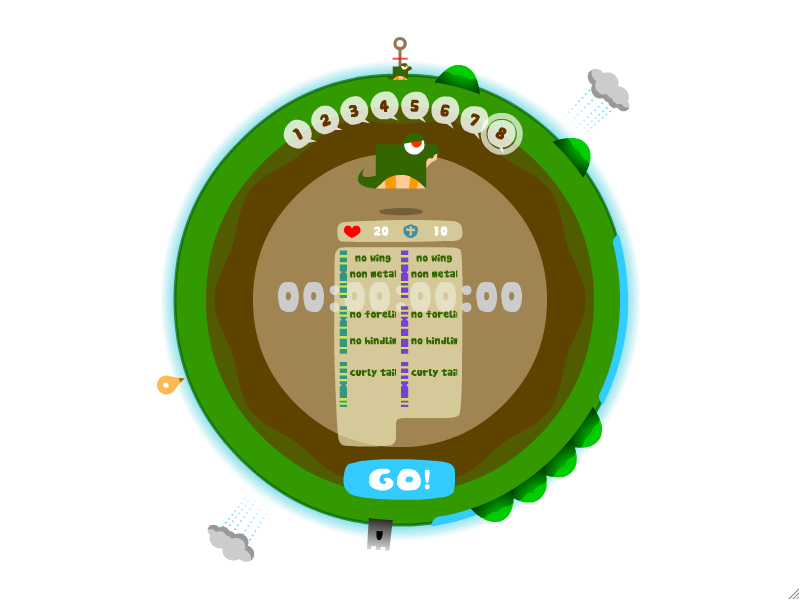
After booth 13, students are packed with angle skills, it is about time sneak into Kalc’s lab. Kalc’s giant safe is secured with an eight-angle combination lock. Every angle will be announced by the safe in a futuristic female voice. This scenario doesn’t really have any controller inputs for interactivity, all the controls are on game master’s mighty clicker. All four angles are numbered when a new combination comes up. Game master will ask question related to the coved concepts, and player(s) have to step on the right angle to respond. Then game master will proceed to the next combination or ask more questions based on the answers. After the 8th combinations, students have successfully broke the lock, and the safe will open up and show the content. What is really in there? it is for students to find out…

We’ve discovered a new way of implementing Smallab into classroom. It is to shift part of game logics into teacher’s hands or even students’ hands. That way, the gameplay becomes more creative and dynamic, and teachers also have more control over the scenarios. It harden the bond between teachers and the scenarios.

SMALLab: Liferaft + Level editor

Posted on September 23, 2009 by Kyle Li

Liferaft is a jungle river adventure game made in SMALLab. Players use glowing controllers to paddle, pump, and signal inside of a broken liferaft. The goal is to get to the river shore without sinking the raft. To succeed this game, players have to avoid obstacles, gather power-ups, pump water out, and manage the weight of their raft.

This collaborative game also has a stand alone level editing tool that allows players to design their own levels on the fly. The tool provides a smooth transition from paper (analogue) prototype into digital game level design. Players plan their level on a set of of three narrow boards resembles the beginning, the middle, and the end of a game level in Liferaft. Then they put color-coded stickers on the board based on their plans. Each color sticker represents a kind of game events. During the planning, players will explain their levels to teachers and game designers including predictions of play experience that their level is going to invoke.

After putting down the stickers, they insert their boards underneath the Computer Vision Box, a support equipment I designed and built to read those color stickers on the three boards. They will then be translated onto the computer screen. The color stickers will be replaced with real game components. Players can either test their level on the screen or send the level into SMALLab and play the real deal there. We usually have groups of players play each others game and give feedback and they will then go through an iterative process to make their game more fun and be close to the play experience they predicted.

PETLab: Mannahatta

Posted on September 5, 2009August 31, 2021 by Kyle Li

8

Overview

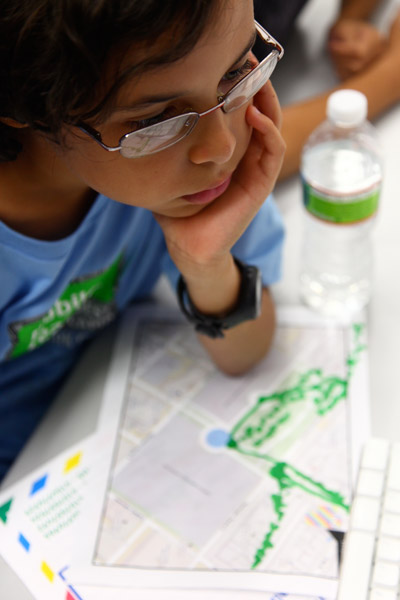
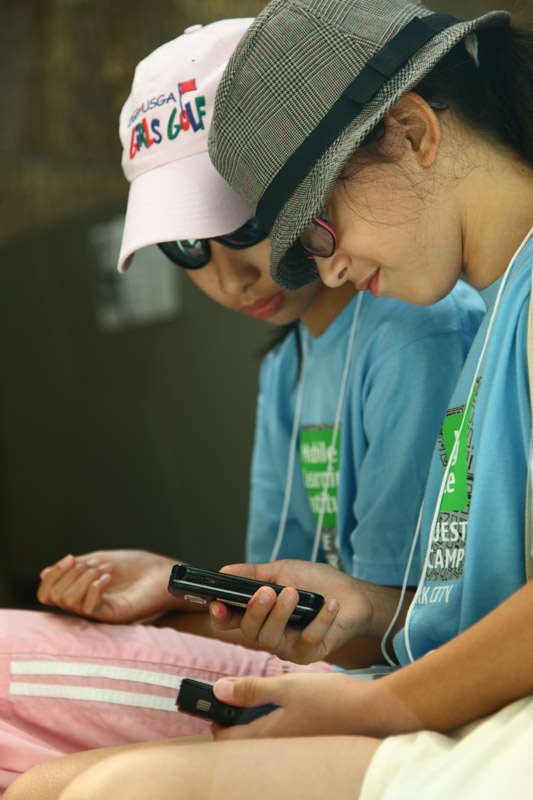
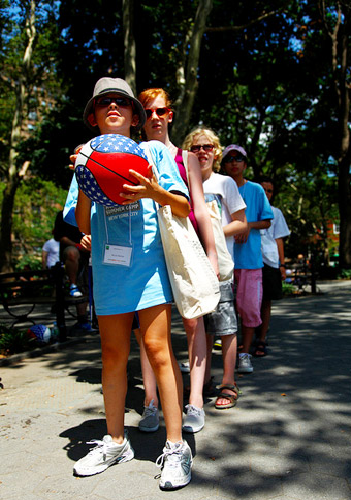
Mannahatta: The Game  is a functional prototype for a location-based smart phone game that maps Manhattan’s historical ecosystem onto its modern day streets. Players move from block to block and gain points when they make connections between ecological elements—including flora, fauna, wind, soil, and water—that existed in the same location when Henry Hudson arrived on the island in 1609. Game play requires growing understanding of ecosystems, managing resources and creating strategic plans for moving about the city.  Working individually or as part of a team, a player must connect ecosystem elements across as wide a territory as possible to collect points, earn badges and move to the top of the leader board. The game is targeted to families and youth aged 10-15 years old.

Mannahatta: The Game was built on data from The Mannahatta Project (http://themannahattaproject.org), created by Dr. Eric Sanderson from the Wildlife Conservation Society. At the scale of a present day city block, Sanderson probabilistically determined the flora and fauna that existed on the island 400 years ago and then mapped into onto the city grid. This relationship between historical data and spatial coordinates transforms the city into a living game board, one that fosters situated learning opportunities, encourages teamwork, and develops systems thinking skills. While the game is only a prototype currently, when finished it will exemplify a new kind of 21st century learning product that advances critical competencies through participatory, interest-driven forms of engagement. To learn more about the project, watch this presentation by Dr. Sanderson at the 2009 Global TED Conference or read the article in the September 2009 issue of National Geographic.

Project Origins and Goals

Mannahatta: The Game is a product of the New Youth City Learning Network, which is a group of cultural institutions working together to create interest-driven learning opportunities for youth in New York City with support from the John D. and Catherine T. MacArthur Foundation’s Digital Media and Learning Initiative. Members of New Youth City include the American Museum for Natural History, Bank Street College of Education, City Lore, Boys and Girls Clubs, Cooper-Hewitt National Design Museum, DreamYard, the Joan Ganz Cooney Center, El Museo del Barrio, MOUSE, the Museum for African Art, the New York Public Library, the New York Hall of Science, the Wildlife Conservation Society, and the World Science Festival.

The concept for M:TG  emerged during two design charrette sessions (the first held in March 2009 and the second in May 2009) where network organizations identified the idea of ‘neighborhood as learning context’ as a key learning principle and a viable organizing mechanism for collective action. To minimize start up costs and to legitimate the notion of extending existing institutional resources, PETLab (at Parsons The New School for Design) developed a game in the spirit of ‘neighborhood as learning context’ from existing assets (a database and website) owned by the Wildlife Conservation Society, a member organization of the Learning Network. The decision to develop M:TG reflects a commonly held conviction among network members that geographic and informatics competencies are critical for educating tomorrow’s youth. This idea also corresponds to an interest in learning about and acting on local context, especially with mobile devices, expressed by youth participants during the March and May sessions, as well as at third charette in June attended exclusively by teenagers.

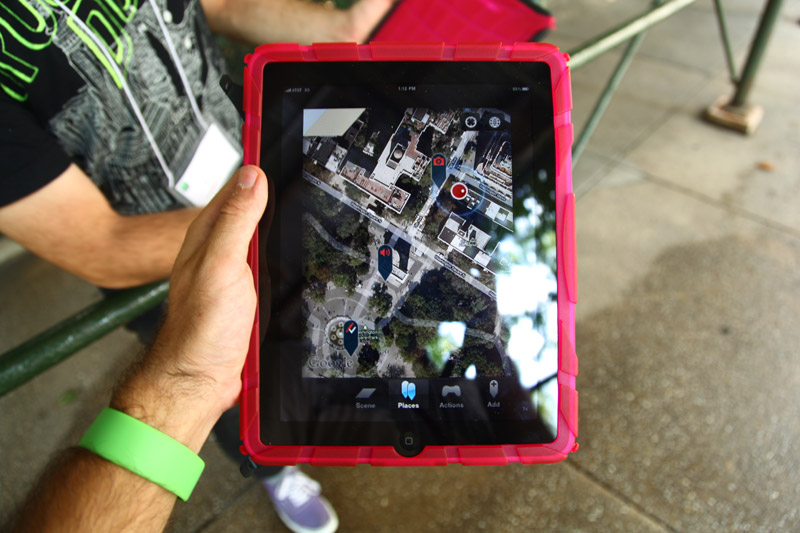
The technical prototype for M:TG was developed over the summer of 2009 by PETLab  (faculty and student members of the Parsons Design and Technology Department).  The team worked for approximately ten weeks to develop the rough prototype, an iPhone application.   The first challenge was how to map the rich content of the data-base into an entertaining and substantive game that could be played persistently throughout the city.  The team’s iterative design process included technical consultation with Eric Sanderson, consultation with New Youth City Learning Network representatives, critique by game designer, educator and Parsons colleague Katie Salen.   Funding for the ten-week pilot project was approximately $90,000.  Over the course of the summer various iterations of the game were tested with different youth groups, including middle school students from Williamsburg Collegiate Charter School; 100, 18 year old English Language Learners, and a group of 12 ,15 year olds in a summer design class at Parsons. Findings from each test informed the next stage of development.

Mannahatta project site
link_icons

Learning Goals

There were four primary learning goals that drove the design and development of M:TG

1. To introduce and develop a visual and biological understanding of the natural ecosystem of Manhattan in 1609
2. To introduce and develop principles of systems thinking
3. To build comprehension in geographic visualization and navigation
4. To promote proficiency in collaborative teamwork
mockup072709

mockups072609

Game Instructions:

Look around Manhattan. What do you see? Concrete, steel, bricks, buildings, streets . . . just about everything is manmade. Now, close your eyes. Imagine yourself here 400 years ago, before European settlement. In those days, the island people, the Lenape, called this place ‘Mannahatta’. Can you envision your surroundings before there was a city under your feet, when the land was covered with lush forests, meadows, streams, ponds, and hundreds of different types of animals?

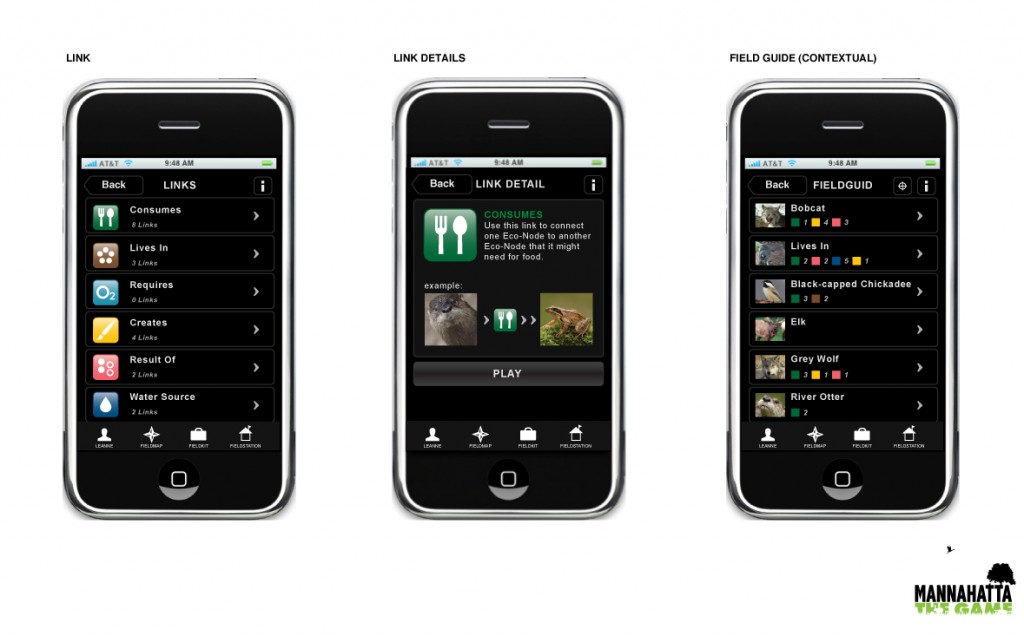
Your mission is to revive that lost natural world. Use your Habitector to identify Links that you can use to connect Elements. Correct connections will reveal new links for you to collect and use in nearby places. Correct connections also surface new elements and earn you points. The more elements you surface, the more you revive an image of the intricate ecosystem of long-ago Manhattan. The more elements you revive, the more badges you earn and the more likely you are to become a Master of Mannahatta.
right-pic

To Start

  • Players are introduced to M:TGvia the website (http://mannahattathegame.com) or through New Youth City Learning Network programming. To play the game, a player first downloads the application from the website and installs it on her iPhone or iTouch.
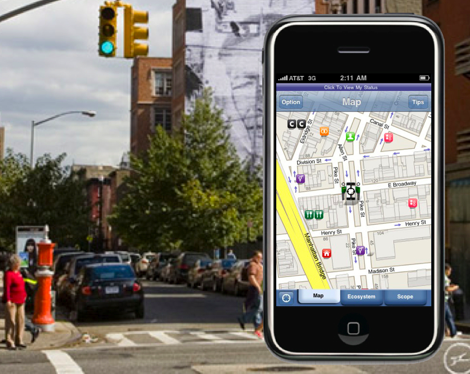
  • The iPhone or iTouch detects the player’s location and references that block as Home Block within the game. If a player is not located in Manhattan, the game defaults to a Times Square location.

To Play

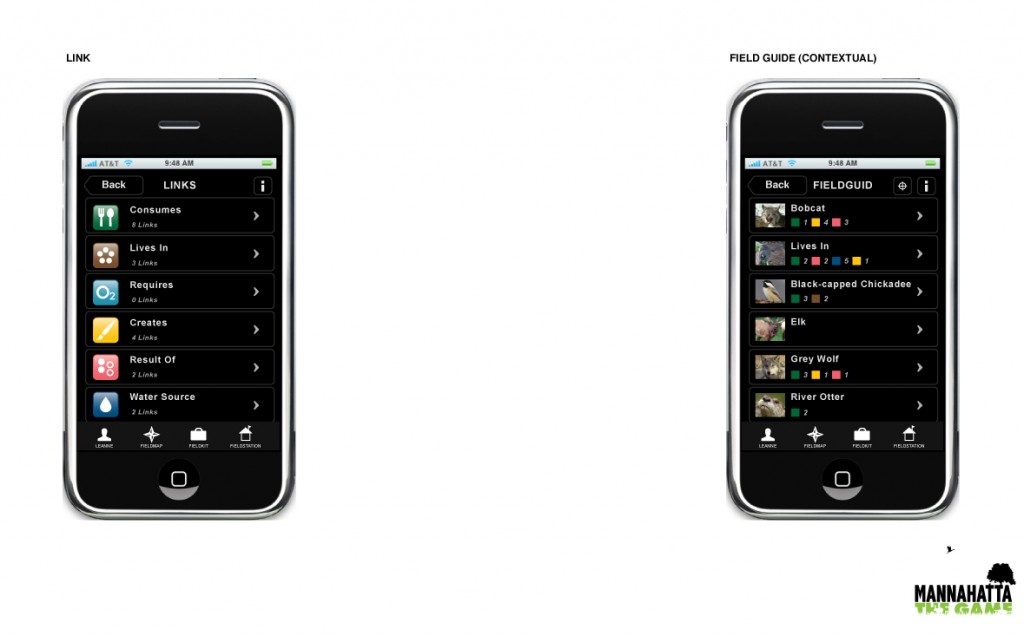
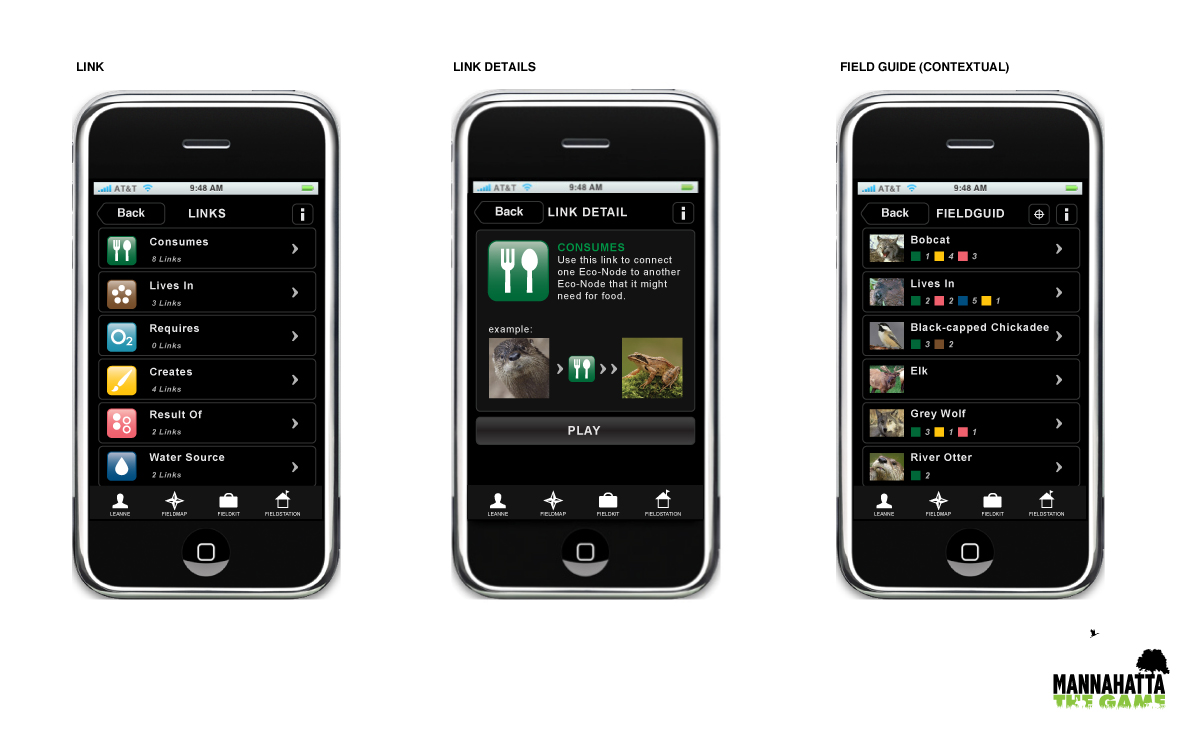
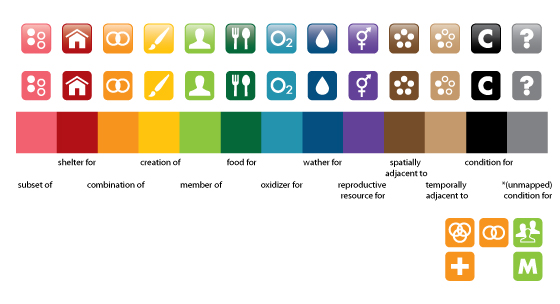
  • New players are provided with a Field Kit that contains an initial set of Links and Elements. A player enters the game when he makes his first connection between a pair of Elements in his Field Kit by using one of the Links provided. Links represent twelve different ways that a player can form relationships between Elements, such as “is food for” and “is shelter for.”
Screen shot 2013-03-04 at 1.09.58 PM

    • The game progresses as a player uses her Habitector to Surface and Connect additional Elements via Links. The maximum Capacity that a play can have in her Field Kit at any one time is 20 Links. This constraint challenges players to make strategic choices regarding which links to play at any one time (a.k.a. which connections to make) and when to move from one block to the next.
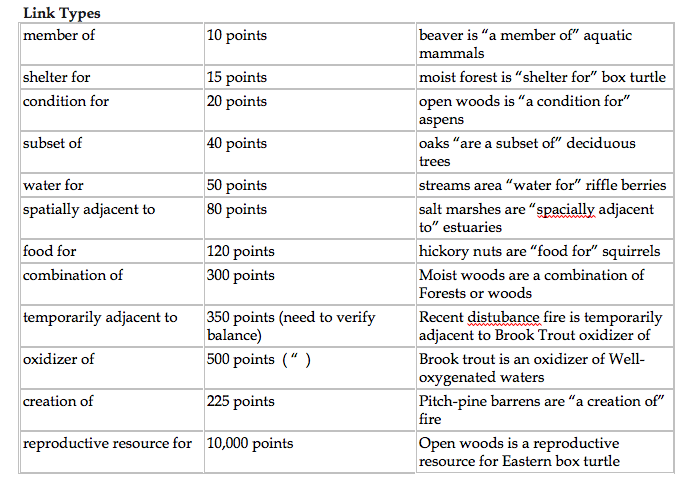
    •  Making connections using links is the scoring mechanism of the game. Correct connections are scored according to their prevalence or rarity within the historical ecosystem, with rare relationships garnering the most points.
    • As they play links and earn points by making correct connections, players also acquire Badges that announce their level of expertise. Expertise is based on the strategic use of Links and and skill at managing which blocks to play. Badges level up from Scout (10 plays of the same Link) to intermediate Ranger (25 plays of the same Link) to Master (50 plays of the same Link). Badges are worth certain points, so, for example, if a player has gained Scout status for five Blocks, Ranger for two, and Master for two, her total points would be 5*20+2*50+2*100 = 400.

Screen shot 2013-03-04 at 1.12.52 PM

  • The game also includes a Leader Board, which ranks the top players city-wide based on total points.
  • Winning: In the current prototype, there is no end state because there are hundreds of millions of connections that can be made across the island. The current version of the game works on a ‘King of the Hill’ principle, in which whomever is on top of the Leader Board at any given moment is the game champion.

Game Terminology

Badge A mark of Player expertise throughout the game. A player earns multiple badges throughout the game based on the strategic way he plays his Links. Badges also come with bonus points.
Block A current NYC city block or zone that defines a single playable unit of space in the game.
Capacity A player’s current inventory of Links. Maximum Capacity for any player at any one time is 20 Links.
Connect The act of joining two interdependent Elements together via a Link.
Connector A feature of the Habitector. Tap it to use a Link to connect two Elements.
Ecosystem The Web of life as well as its non-biological support system (such as soil and water). Ecosystem elements vary from Block to Block.
Element Any ecological entity (i.e., species, habitat, specific types of wind, soil, water) that existed on the island of Mannahatta in 1609. The main point of the game is to make the correct connections between the Elements in a Block using Links. New Elements are Surfaced through game play.
Field The island of Manhattan serves as the game board or Field.  A player must move outdoors through the physical space of the city to play successfully.
Field Guide An information guide that can be accessed at any time during game play. The field guild helps players find information about different aspects of the Ecosystem.
Generate Every time two Elements are connected using the Connector, a player generates another playable Link. The new link appears in her Field Kit by when she moves to an adjacent Block.
Habitector The locative capacities of the iPhone (GPS) and iTouch (cellular triangulation) allow the device to locate a player within the game and about the island.
Leader Board Ranks players overall according to individual achievement in points and accumulation of Badges (Scout, Ranger and Master).
Link The play in the game that joins two Elements together. The more Links played in the game, the more points and badges a player earns. Linking is also the means of Surfacing a larger and larger percentage of the total Ecosystem.
Scope A Habitector feature that allows a player to view the activities of other players. The Scope provides information about the activity on the Block where a player is currently located, an activity overview about game play across the entire island, information about the point scores and badges of other players, and the Leader Board.
Status The Status button allows a player to see her point score and Badge ranking. Status also displays a player’s current Link Capacity, total number of Links played, and total zones visited.
Surface As players successfully connects Elements with a Link using the Connector, more elements are Surfaced.

Technical Information

The Game’s custom software serves as the primary locative controller and resides within the iPhone device or Habitector. The Player installs the software by downloading the application from The Game’s website. (The iPhone was chosen based on the understanding that most New Yorkers ages ten and up, regardless of socioeconomic status, carry cell phones and that in three years time most cell phones will be “smart phones” similar to today’s iPhone.)

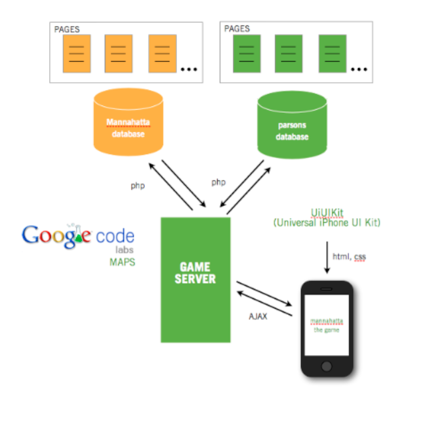
The  Game is built as a Safari Web App with a home screen navicon. The game server runs on the back end.  The game makes use of the data from The Mannahatta Project.  The game system built during the Summer of 2009 comprises the game server, the front end built using the iPhone universal UI kit, and the Google Maps API for location-based functionality.  The back end provides the front with pages that represent different screens filled in with data as needed. The primary programming language on the front-end is Javascript, which uses the jQuery library for AJAX and display functions.  PHP calls handle the communication with the databases.  The diagram below shows the basic architecture.
Screen shot 2013-03-04 at 1.23.15 PM

SMALLab in Arizona Museum of Science!

Posted on April 24, 2009 by Kyle Li

SMALLab New York was invited by David Birthfield, the creator of SMALLab, to participate a weekend exhibition at Arizona Museum of Science. We were challenged to create a game scenario using a Roomba robot. Thanks to David, most of the framework and pipeline was already set up for bringing in the famous robot, all we have to do on the technology part is just tweaking the code to perfection.

Initially, we were looking into player-controlled map navigation because of the nature of Roomba, it goes places. Claudio did a few iterations on this idea and had Roomba walking on maps and some amazing over-size photography. Our second idea was to remove the player control from the Roomba and have it roam free in the space through simple algorithm. This was where the fun started to pour out. We decided to assign Roomba a goal to achieve in the SMALLab space and players become Roomba’s guardians against enemies in the way.

The game scenario is called SWARM. It is a 2 player + 1 robot game. Players has to guide the Roomba mother ship through a swarm of alien wasps. Player 1 has the ability to attract Roomba while player 2 repels dangerous wasps with its high-frequency pulse wave. Little do we know, younger kids went crazy with the wasps on the floor projection. Regardless if they are playing or not, all of them are helping the Roomba by stomping those wasps with their feet. We had a great time visiting Arizona museum of Science and working with the SMALLab crew there. At one point, there were about 18 busful of kids storm through our exhibition with their parents, and about 1500 peoples in total over the course of two days according to the museum.

Rainbow Hero: Animation Study

Posted on November 19, 2008 by Kyle Li

D-pad + spacebar

TreesNYC

Posted on August 30, 2008 by Kyle Li

TreesNYC is designed to suggest game mechanics for a casual game with content from New York City’s vast database on its sidewalk trees. In the prototype a single player is cast in the role of a Parks Department employee during a day on the job caring for the trees on one city block. The object of the game is to achieve a high score by completing horticultural tasks and, by end of game, to learn about and address all of the locale’s arboreal needs. Tasks include watering, feeding, trimming, and planting. The player must choose and operate necessary tools on the main avatar, a Parks Department tree maintenance truck. The goal is to bring trees into the forefront of the conception of urban spaces, with some additional understanding of the forces that can support or stress urban ecosystems. Our collaborator was an instructor from The New School architecture faculty. The next iteration will more fully embody a curriculum for middle school based on the ecology of trees in The City of New York.

DIVER 2000 SERIES CX-1

Posted on June 18, 2008October 3, 2022 by admin
Unboxed in 97 5th Avenue Apt. 3D

Nana

Posted on May 20, 2008November 2, 2023 by Kyle Li

Nana, my MFADT thesis, is a non-player game built with a modified video game console and a repurposed game controller. The project reduces the role of human players to mere spectators and explores the interplay between machines. Nana, the name of the little robot, is a curious video game controller with a mobile sub-unit. She rolls on a flat LCD screen and communicates the information she found on the colorful screen to the game console (The Mother). The Mother reads the information and turns them into various direct and indirect outputs, mostly in the forms of sound and visual. Once a while, when the information sequence is matching certain condition that is agreed between Mother and Nana, Mother will turn the screen off. Nana will then take a rest, and a random bedtime story about Nana will be narrated by Mother before everything goes back to normal.

I didn’t come to DT to be a creative technologist, but like most of my peers, I was seeking a change in my design career. After I took all the necessary steps and figured out how to built a Simon Says electronic game in the physical computing (pcomp) class, it was clear that interactive electronics is the change I was looking for. That being said, I started late, I didn’t dive into the world of physical computing right in the beginning, so when I entered my thesis year, I was still taking pcomp themed courses. Every Time I am introduced to a new possibility, I will change a part of my thesis if not all of it, that drives my thesis teacher nuts. I tried to catch up and get ahead. Eventually, I landed on the idea of Mother and Nana, an expandable and interconnected system that can grow with my newly gained knowledge.

I created a circuit to read the voltage sent to the vibration motors in the game controller. The strength of the voltage is controlled by API in XNA. Therefore, I can create my own protocol to map the strength of the voltage to a set of commands in my microcontroller (BS2). For input to the XNA, I use the analogue stick(s), it is made of two potentiometers with about 10K resistance each. In XNA, the resistance will be mapped to a number between -1 and 1.


I had a lot of fun hacking Xbox 360 controllers, especially making the slave mobile sub-unit. It is made of two modules, a motor module and secondary communication module (SCM). The motor module came straight from an old toy of mine, it has two sets of geared motors well intergraded together in a metal structure. SCM is slightly complicated. It is made of an Atari 2600 cartridge PCB, a BASIC Stamp 2 (BS2), a motor driver, and a set of two optoisolators. When I designed this chassis I decided to look back to early video game hardware for inspirations. I have been using the Atari 2600 cartridge PCB for some of my BS2 projects in the past. The PCB has exactly the same number of pins as a BS2 chip. I usually mount my BS2 on a PCB, and use it with a regular Atari 2600 connector, it looks really nice on top of a robot.

https://makezine.com/2008/05/30/parsons-design-technology-1/

photo credit: Noam Berg (MFADT 2009)

XBOX 360 Asteroid Pop-A-Balloon

Posted on April 9, 2008March 12, 2023 by Kyle Li

Experiment on alternative haptic technology. This balloon popper is driven by a modified Player 2 XBOX 360 controller, one of the vibration motors of which was replaced with an air pump. In this specific experiment, the pump responses to the player 1’s movement!

Posts navigation

Older posts
Newer posts

Recent Posts

  • BMP – Rearrange Colormap
  • Reset Allow USB Debugging? Notification
  • 8-bit Notes
  • AT29C256 90PI
  • Super-Toys Last All Summer Long

Archives

Proudly powered by WordPress | Theme: MiniZen by Martin Stehle.