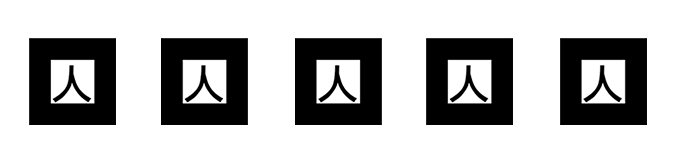
Markers:
Beta Software:
-Mac OSX:
http://a.parsons.edu/~lik43/otherz/ARRV.zip
-WIN 32-bit:
http://a.parsons.edu/~lik43/otherz/ARRVWIN.zip
*Window users please make sure you have the “digital component for QuickTime for Windows (VDIG)” installed on your computer. If you don’t have it, please download one from here:
Version 1.0.1 WinVDIG installer
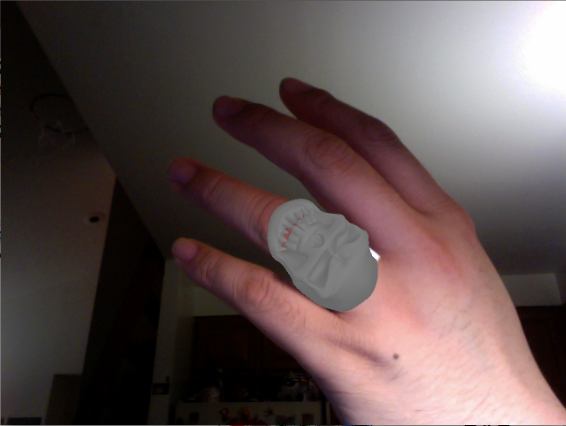
AR Ring Viewer is made with Processing.
Skull ring 3D model is designed by Chuck Lee
Faces: 46648
3ds file size: 1.09mb
How:
1. Print the marker out and tape one on your finger
2. Download the demo that suits your OS
3. Unzip it
4. Run the executable (SHOKON.exe or SHOKON.app) inside the folder
5. Have Fun!
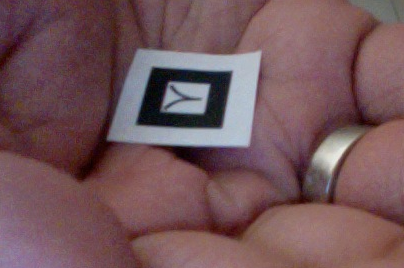
(make sure there is white part left around the marker for better tracking)
Advanced play:
You can replace the skull4.3DS inside of the data folder with a 3DS model of yours, as long as the name is the same (skull4.3DS), it should work fine!
3 Model Notes to self:
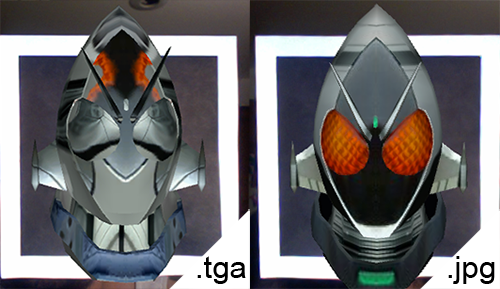
In 3ds Max, export as a .3ds file. The textures (Materials) has to be in .jpg or .png format. Image type .tga will not work properly. Following is an AR bust of Kaman Rider Fourze with texture, they are the same model, only the texture image format are different.
Next Steps:
-custom marker
-load models
-size adjustments
-showcase mode
-animate PMatrix3D