The modding experience of Dragon Dogma: Dark Arisen feels oldschool – full of app-hopping and text/xml editing.
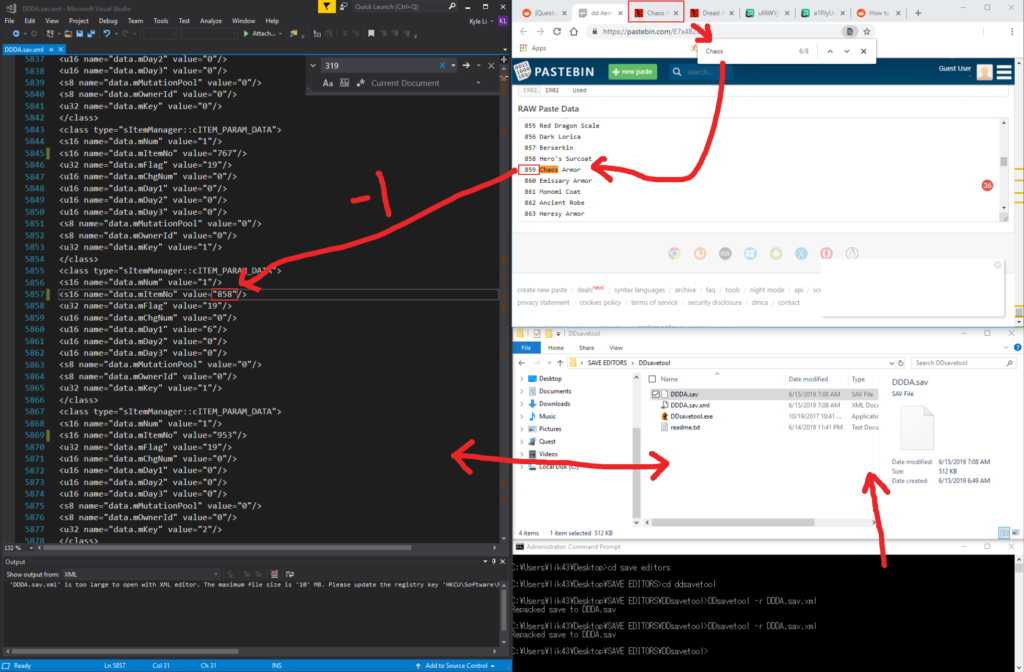
Save Command Prompt tool by fluffyQuack:
http://www.tzarsectus.com/tools/DDsavetool.rar
The list of 1900 items that are available in Dragon Dogma:
https://pastebin.com/E7x4B2u9
Combining instructions from different places and my own experience:
- Unzip DDsavetool into a directory
- Use Checkpoint tool to extract the save file from Dragon’s Dogma
- Make a backup of your save file and place the original one in the DDsavetool directory
- Change the file name from “DD_Savedata” to “DDDA.sav”
- Drag your save file directly onto the “DDsavetool.exe” which will create “DDDA.sav.xml” in the same folder
- Open “DDDA.sav.xml” in a text editor of your choice
- To put items into inventory you want to search for mItemCount (control + f)
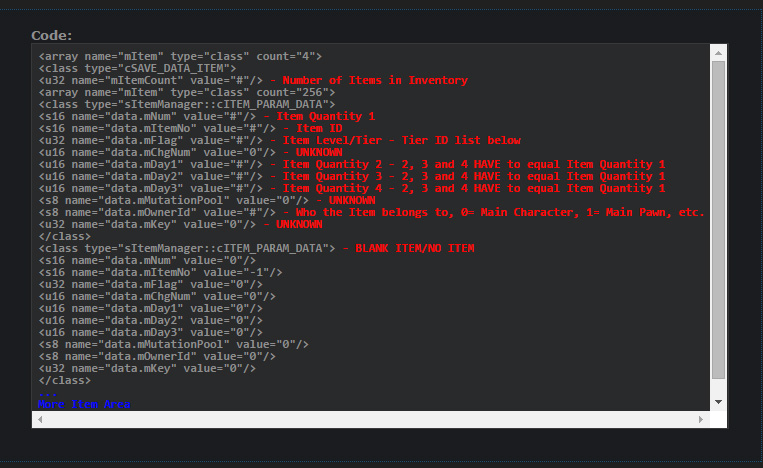
- Based on the reference picture below, change the values (#) as seen:
- item quantity 1 to 1
- item ID to whatever item you want
- set item quantity 2, 3, and 4 to the same as 1
- Make sure to update the mItemcount to the new total.
- Save and close the xml
- Delete the “DDDA.sav” file that was in the folder
- Open the Command Prompt with the administrative privilege and navigate to the DDsavetool folder
- Input “ddsavetool -r DDDA.sav.xml” and press Enter
- “DDDA.sav” will appear in your DDsavetool folder, change the file name back to “DD_Savedata” (no extension)
- Use Checkpoint tool to restore the save back to the game.
Tier IDs:
- 3 – No Stars, Tier 0
- 13 – 1 Star, Tier 1
- 19 – 2 Stars, Tier 2
- 35 – 3 Stars, Tier 3
- 67 – Dragonforged, Tier 4
- 515 – Silver Dragonforged, Tier 5
- 1027 – Gold Dragonforged, Tier 6
After some trials and errors, there is an offset of -1 for the item numbers found online e.g. Ascalon is 319 on the website, but the actual mItemNo is 318. The -1 work for all the weapons and equipment I put in including an Ascalon and Chaos Armor pieces.


I do not completely understand how this save work. Sometimes I followed the instructions but items didn’t show up. When I edited the save, I would change a tier ID of an existing item so I know the save is being updated in the game. The disappearance might have to do with those unknown parameters in the xml. Anyway, it was fun.