I cleaned up the code and tested it, I was able to read MPU6050 for an hour in Unity 3D without freezing or interruption. Here is what I did:
- I removed the wire that connects to INT on MPU6050
- I connected AD0 on MPU6050 to GND.
- I use Arduino Uno for this test, if you are using the Leonardo board, the SCL and SDA pins are different (D2 and D3). This is done to prevent unnecessary interruption and freezing.
- Change the API Compatibility in Unity to .NET 4.x.
Build setting > Player Setting > Other Setting > Api Compatibility Level > .NET 4.x - Update the port name in the Unity code
Also, in the Arduino code, you can decide what data to print to the serial port. Look for this string: #define OUTPUT_READABLE_EULER look around it and read the description of different data outputs, I am using this one above which is rotation data.
Notes from the past:
Finally, this day has come for me to play with an MPU-6050 – a 3 Axis Analog Gyro Sensors+ 3 Axis Accelerometer Module.
Found out a tutorial on Arduino Playground:
https://playground.arduino.cc/Main/MPU-6050/#sketch
“Reading raw values is easy, the rest is not”
For serious use of the MPU-6050, Jeff Rowberg has done an excellent job.
See his I2C lib: http://www.i2cdevlib.com/devices/mpu6050
Or the latest code on GitHub: https://github.com/jrowberg/i2cdevlib/tree/master/Arduino/MPU6050
The FreeIMU library includes the MPU-6050 code from Jeff Rowberg.
The FreeIMU library: http://www.varesano.net/projects/hardware/FreeIMU
To start with the MPU-6050, see the page of InvenSense: https://www.invensense.com/products/motion-tracking/6-axis/mpu-6050/
Since my ultimate goal is to use it with Unity 3D, I also found this promising library – Uduino.
https://youtu.be/8YP8HrcGr9M
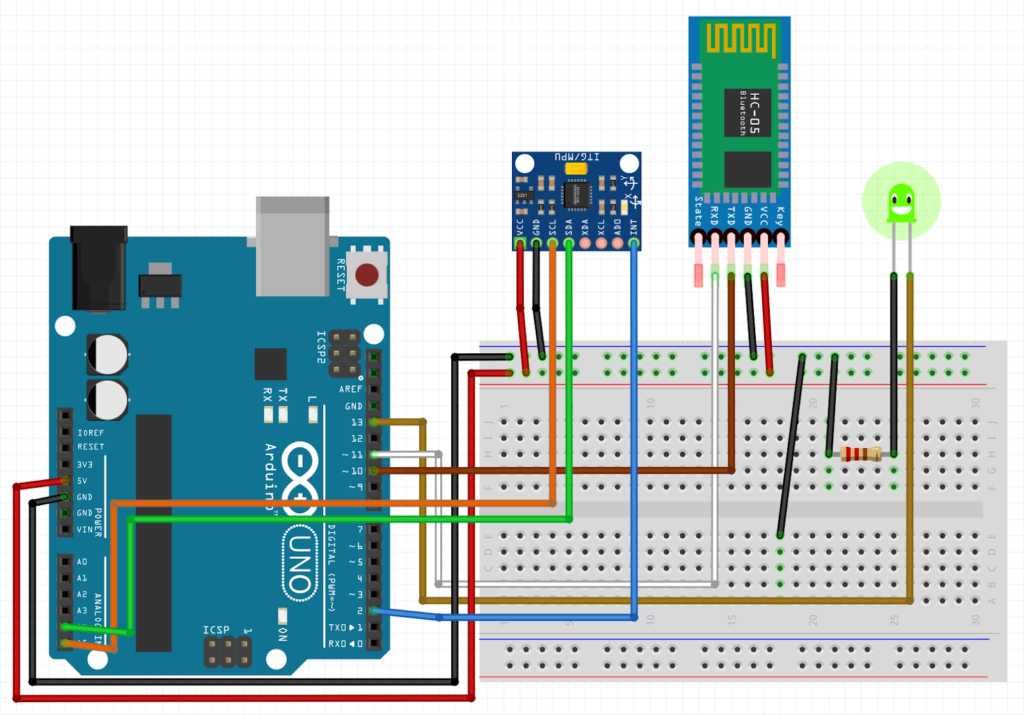

I cleaned up the code and tested it, I was able to read MPU6050 for over an hour in Unity 3D without freezing or interruption. Here is what I did: 1. I removed the wire that connects to INT on MPU6050, 2. I connected AD0 on MPU6050 to GND. Magic!